Showing posts with label geometry. Show all posts

Wednesday, December 6, 2017

Equation of Circle in 3D and Snap Tangent

For a time I was on a bit of an AutoCAD like calculation kick and went through some interesting calculations like snap tangent, snap perpendicular, and intersection of a line with a plane. I wanted to take the next step on snap tangent and consider snap tangent to a sphere.

Snap tangent means, start with some point and try to find a point on the destination object (circle, sphere, ellipse, anything) that causes the line segment between the first point and the second point to be tangent to the object selected. My post about snap tangent, showed the result for a circle and worked in 2D. If you get the concept in 2D and are ready to take the concept to 3D for a sphere, you probably recognize without proof that the set of possible points on the sphere which will result in a tangential point, forms a circle. You can pretty much mentally extrapolate from the following picture which a repeat from the previous post.

Fig. 1 - Can you imagine the snap tangent circle on this if we allow the figure to represent a sphere? The snap tangent circle has center \(E\) and radius \(a\).
I will not repeat the method of calculation from the previous post but will simply observe that we can produce the values \(E\) and \(a\), which are the center and radius of the snap tangent circle. We add to this the normal of this circle, \(N = A - C\), and then normalize \(N\).

So, now we need a way to describe this circle which is not too onerous. A parametric vector equation is the simplest expression of it. We take our inspiration from the classic representation of circles in parametric form, which is
\[ p(\theta) = (x(\theta), y(\theta)) \] \[ x(\theta) = r \cos{\theta} \] \[ y(\theta) = r \sin{\theta}. \]
We have a normal from which to work from, but we need to have an entire coordinate system to work with. The classic parametric equations have everything in a neat coordinate system, but to describe a circle that's oriented any which way, we need to cook up a coordinate system to describe it with. Observe a change to the foregoing presentation that we can make:
\[ p(\theta) = r \cos{\theta} (1, 0) + r \sin{\theta} (0, 1) = r \cos{\theta} \vec{x} + r \sin{\theta} \vec{y}\]
The normal vector we have is basically the z-axis of the impromptu coordinate system we require, but we don't have a natural x-axis or y-axis. The trouble is there are an infinite number of x-axes that we could choose, we just need something perpendicular to \(N = (n_x, n_y, n_z).\) So, let's just pick one. If I take the cross product between \(N\) and any other vector that isn't parallel to \(N\), I will obtain a value which is perpendicular to \(N\) and it can serve as my impromptu x-axis. To ensure I don't have a vector which is close to the direction of \(N\), I will grab the basis vector, which is the most "out of line" with the direction of \(N\). So, for example (F# style),

        let b = if abs(normal.[0]) <= abs(normal.[1]) then    
                    if abs(normal.[0]) <= abs(normal.[2]) then
                        DenseVector([| 1.0; 0.0; 0.0 |])
                    else
                        DenseVector([| 0.0; 0.0; 1.0 |])
                else
                    if abs(normal.[1]) <= abs(normal.[2]) then
                        DenseVector([| 0.0; 1.0; 0.0 |])
                    else
                        DenseVector([| 0.0; 0.0; 1.0 |])

In this case, I have 
\[\vec{x} = b \times N\] \[\vec{y} = N \times \vec{x}.\]
Using this impromptu coordinate system, I can express an arbitrary circle in parametric form, having center \(C\) and radius \(r\) as
\[ p(\theta) = C + \vec{x} r \cos{\theta} + \vec{y} r \sin{\theta}.\]
Thus, our snap tangent circle is given from above as 
\[ p(\theta) = E + \vec{x} a \cos{\theta} + \vec{y} a \sin{\theta},\]
where we would use \(N = A - C\) (normalized) to be the beginning of our coordinate system.

Tuesday, December 6, 2016

Packing Spheres into a Cube

In this post I compare three different alignment strategies for putting spheres into a cube. Our main variable will be \(n\), the ratio of cube side to sphere diameter. The question is, how many spheres can we get into the cube? We denote the number of spheres as \(S\).

Matrix Alignment

The simplest alignment of spheres to think about is a matrix alignment, or row, column, layer. If \(n=10\), then we can fit 1000 spheres into the cube this way. Or, in general, \(S=n^3\).
Fig. 1. Matrix alignment.
One way to summarize this alignment is that each sphere belongs to its own circumscribing cube and none of these circumscribing cubes overlap each other. For small values of \(n\), this arrangement is optimal.

Square Base Pyramid Alignment

An improvement to \(S\), for larger values of \(n\) is had by making the alignment of subsequent layers offset. Start with a layer in a square arrangement (\(n\) by \(n\)). If you look down on this first layer, it's awfully tempting to nestle the next layer of spheres in the depressions between the spheres. We will make better use of the interior space, although we won't make as good a use of the space near the edges. But if we can get enough extra layers in to make up for the losses near the outside, that would carry the day.

Fig. 2. A few red dots show where we're thinking of putting the next layer of spheres. We won't fit as many on this layer, but the second layer isn't as far removed from the first.
In the matrix alignment, consecutive layers were all a distance of 1 unit between layers (center to center). With this current alignment, we need to know the distance between layers. We need to consider a group of four spheres as a base and another sphere nestled on top and find the vertical distance from the center of the four base spheres to the center of the top sphere. (Implicitly, the flat surface the four base spheres are resting on constitute horizontal. Vertical is perpendicular to that.)

Fig. 3. Top view of a square base pyramid packing arrangement.
We can see from Fig. 3., that line segment ab is  of length \(\sqrt{2}\). We take a section parallel to this line segment, shown in Fig. 4.

Fig. 4. We recognize a 45°-45°-90° triangle, abc.
We can calculate the vertical distance between layers, line segment cd, as \(\sqrt{2}/2 \approx 0.7071\dots\). Note that the spheres in this second layer are in basically the same configuration as the bottom layer. We can see this will be the case because the top sphere in Fig. 3., has its outer circumference pass across the point where the lower spheres meet. So adjacent spheres in the second layer will be in contact. And, further, second layer spheres will follow the rectangular pattern of depressions in the bottom layer which are spaced apart the same as the centers of the spheres in the bottom layer. So we will end up with the same organization of spheres in the second layer as the bottom layer, just one fewer row and one fewer column.
We can now calculate the number of spheres that will fit in a cube using this alignment as
$$S = n^2 \lambda_1 + (n-1)^2 \lambda_2,$$
where \(\lambda_1\) is the number of full layers and \(\lambda_2\) is the number of "nestled" layers. (The third layer, which is indeed "nestled" into the second layer is also returned to the configuration of the first layer and so I refer to it as a full layer instead. The cycle repeats.) To find \(\lambda_1\) and \(\lambda_2\), we first find the total layers, \(\lambda\) as
$$\lambda = \left \lfloor{\frac{n-1}{\sqrt{2}/2}}\right \rfloor+1$$
The rationale for this formula is: find how many spaces between layers there are and compensate for the difference between layers and spaces. Imagine a layer at the very bottom and a layer at the very top (regardless of configuration). The layer at the bottom, we get for free and is the 1 term in the formula. (The top layer may or may not be tight with the top when we're done but hold it up there for now.) The distance from the center of the bottom layer to the center of the top layer is \(n-1\). The number of times we can fit our spacing interval into this number (completely), is the number of additional layers we can fit in. (Additional to the bottom layer, the top layer is the last of the layers we just found room for in the \(n-1\), or, technically, \(n-1/2\), er, whatever, do some examples.)
The break down between \(\lambda_1\) and \(\lambda_2\) will not be exactly even, with \(\lambda_1\) having one more if \(\lambda\) is odd. We can show this neatly using the ceiling operator 
$$\lambda_1 = \left \lceil{\lambda/2}\right \rceil$$
$$\lambda_2 = \lambda - \lambda_1$$
As early as \(n=4\) we get \(S=66\), which is better than the matrix arrangement by 2 spheres. I modeled this to make sure I didn't let an off by one error sneak into my formula (see Fig. 5.).
Fig. 5. Somewhat surprisingly, rearrangement of spheres (relative to matrix alignment) produces gains in volume coverage even at \(n=4\).
Here it is in Maxima:


Tetrahedral Alignment

Another rearrangement is similar to a honeycomb. A honeycomb is an arrangement of hexagons that meet perfectly at their edges. Pictures of this are readily available online. This Wikipedia article suffices. Imagine putting a circle or a sphere in each of these honeycomb cells. The will produce a single layer which is more compact, although it will push the distance between layers apart. 

So, what do we need to know to make a formula for this one?
  1. Find the distance between successive layers.
  2. Formula for the number of layers.
  3. Formula for the number of spheres in each layer.
    1. This depends on knowing the range of layer configurations (we will only have two different layer configurations).
  4. Some assembly required.
This is the same procedure we followed already for the square based pyramid alignment, but we are being more explicit about the steps.

Fig. 6. We need to find the distance of line segment ad.
We recognize we have an equilateral triangle and so we can identify a 30°-60°-90° triangle on each half of altitude ab. We have drawn all of the angle bisectors for this triangle which meet at a common point (commonly known property for triangles). We can recognize/calculate the length of bd as \(\frac{1}{2\sqrt{3}}\). We can then calculate the length of ad as \(\frac{\sqrt{3}}{2} - \frac{1}{2\sqrt{3}} = 1/\sqrt{3}\). From the Pythagorean theorem, we have a length for cd of \(\sqrt{2/3}\).
The number of spheres in the first layer will require us to use the distance for ab. We now need to find the number of rows in the bottom layer. We have
$$L_1=n \rho_1 + (n-1) \rho_2,$$
where \(\rho_1\) and \(\rho_2\) are the number of each kind of row in the layer and \(L_1\) is the number of spheres in the first layer. Since rows are spaced by \(\sqrt{3}/2\), we have a number of rows, \(\rho\), of
$$\rho = \left \lfloor{\frac{n-1}{\sqrt{3}/2}}\right \rfloor+1$$
and \(\rho_1\) and \(\rho_2\) can be broken out similar to our \(\lambda\)'s earlier.
$$\rho_1 = \left \lceil{\frac{\rho}{2}}\right \rceil$$
$$\rho_2 = \rho - \rho_1.$$

Fig. 7. We're looking for the distance of line segment cd which can be found using ac and ad.
Now, there is a little matter of how nicely (or not) the second layer will behave for us. It is noteworthy that we are not able to put a sphere into every depression. We skip entire rows of depressions. (The Wikipedia article on sphere packing referred to these locations as the "sixth sphere".) These skipped locations may play mind games on you as you imagine going to the third layer. Nevertheless, the third layer can be made identical to the first, which is what I do here.

Fig. 8. The first layer is blue. The second layer is red. Are we going to have trouble with you Mr. Hedral?
There's a couple of things that happen on the second layer. First, instead of starting with a row of size \(n\), we start with a row of size \(n-1\). The second issue is that we may not get as many total rows in. We could do the same formula for rows again but now accounting for the fact that we have lost an additional \(\frac{1}{2\sqrt{3}}\) before we start. However, we can reduce this to a question of "do we lose a row or not?" The total distance covered by the rows, \(R\), for the bottom layer is
$$R = (\rho-1) \frac{\sqrt{3}}{2} + 1$$
If \(n-R\ge\frac{1}{2\sqrt{3}}\), then we have the same number of total rows. Otherwise, we have one less row. We let \(r_L\) represent the number of rows lost in the second layer, which will either be 0 or 1. Noting that the order of the rows is now \(n-1\) followed by \(n\), we can give an expression for the number of spheres, \(L_2\), in our second layer now.
$$L_2 = (n-1)(\rho_1 - r_L) + n\rho_2$$
We have a very similar formula for the total number of spheres in the box.
$$S = L_1\lambda_1 + L_2\lambda_2,$$
where
$$\lambda_1 = \left \lceil{\frac{\lambda}{2}}\right \rceil$$
$$\lambda_2 = \lambda - \lambda_1,$$
where
$$\lambda = \left \lfloor{\frac{n-1}{\sqrt{2/3}}}\right \rfloor+1.$$
My Maxima function for this is


Comparison Between Methods

It isn't too hard to tell that one of the two second approaches is going to produce better results than the first after some value of \(n\) (Fig. 9.). What is more surprising is that our latter two alignments stay neck and neck up into very high values of \(n\). If we divide them by the volume of the containing cube, both appear to be a round about way to arrive at the square root of 2! (Fig. 10.)
Fig. 9. Both of the latter approaches give much better packing densities than the matrix alignment.
Fig. 10. Square base packing in blue, tetrahedral packing in red, both divided by total volume (# of spheres/unit volume). Unclear if there is a distinct winner and we seem to be getting closer to \(\sqrt{2}\).

Let's see which one wins more often for positive integer values of \(n\) in Maxima.

So, there's no run away winner, but if you're a betting man, bet on square base pyramid packing out of the available choices in this post. Regardless, it appears that both of these packing arrangements approach optimal packing (see Sphere packing). My density calculation (allowing the \(\sqrt{2}\) conjecture) for volume coverage comes out to
Gauss, old boy, seems to have approved of this number.

Thursday, August 6, 2015

Polylines: Radius-Bulge Turnaround

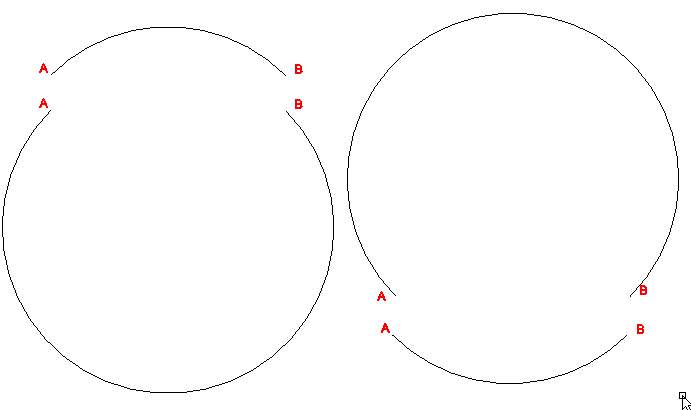
The dxf representation of LWPOLYLINEs represents arcs using the end points of the arc and a bulge factor which is the tangent of a quarter of the central angle of the arc (see this previous post). We want to interchange between the radius and the bulge factor (both ways). Let's pull up the earlier diagram.

Looking at the diagram, we can produce several useful formulas. Taking the bulge factor as \(b\), observe that
\[b = \tan {\theta \over 4} = {i \over u/2} = {2 i \over u}\tag{1},\]
where we are temporarily ignoring the issue of sign.
The distance \(u\) is simply the distance from \(A\) to \(B\) and these point are always given to us in the context of a polyline whether we are given the bulge factor or the radius. We write this as 
\[u = ||B-A||.\tag{2}\]
Using the Pythagorean theorem we have
\[r^2 = {u^2 \over 4} + a^2 .\tag{3}\]
Using the substitution \(a=r-i\), we obtain
\[r^2= {u^2 \over 4} + (r-i)^2 = {u^2 \over 4} + r^2 - 2 r i + i^2\]
and so
\[2 r i = {u^2 \over 4} + i^2.\tag{4}\]

Radius/bulge direction => Bulge factor

Using equation (3), we can solve for \(a\)
\[a = \sqrt{r^2 - \frac{u^2}{4}}.\]
From this we can obtain \(i = r - a\) which allows us to calculate \(b\) according to equation 1. Additionally, set the sign of \(b\) to be positive for a CCW arc and negative for a CW arc. Alternatively stated, \(b\) is positive if the peak of the arc is a right offset from ray \(\overrightarrow{AB}\) and negative if the peak is a left offset from ray \(\overrightarrow{AB}\). In our diagram above, if point A comes before point B in the order they occur in the polyline, then we have a CW arc (P offset to the left of \(\overrightarrow{AB}\)) and so \(b\) should be negative. A negative bulge value indicates bulging to the left and a positive value indicates bulging to the right.

Bulge factor => Radius/bulge direction

We calculate \(u\) from \(A\) and \(B\) and then substitute equation 1 (solved for \(i\)) into equation 4 to get
\[2 r \frac{b u}{2} = \frac{u^2}{4} + \frac{b^2 u^2}{4}\]
\[4 r b =  u + b^2 u\]
\[r = u \left(\frac{1 + b^2}{4 b}\right).\]
Note that we would actually use the absolute value of \(b\) to obtain a positive radius. We can use the same logic as above for determining CW versus CCW (it's "iff" logic).

Locating the Center Point

Whether we are given the radius or bulge factor, we may want to find the center point. From above, we know we have \(u\), \(i\), \(b\), \(r\), and \(a\) all easily available to us if we need them.

We take our unit vector for the direction of the line segment taken from \(A\) to \(B\) as \(d = (B-A)/u\). Then the normal direction (90° right turn for offsetting) is given by
\[N = (d_y, -d_x).\]
Taking \(\sigma = {\rm signum}(b)\),
\[C = \frac{A+B}{2} - \sigma a N\]
\[P = \frac{A+B}{2} + \sigma i N\].

In my next post, I show a way to implement this in Maxima.

Monday, April 6, 2015

Dynamic Zoom in LispWorks' CAPI

Using the LispWorks' CAPI, I have implemented a simple program to demonstrate the basic elements in the implementation of a 2D dynamic zoom feature. The program is basically uninteresting except for the dynamic zoom implementation. You can start with the code immediately, or skip to the other side for a few comments and refer back.


Every time the user clicks the left button (:button-1), the mouse location is trapped and turned into a "model" location for a line starting position. If the user presses the right button (:button-3) the common terminal point for all of the lines is changed—the same principle of storing a "model" point is followed. Basically it is a spider with as many legs as you want originating from whatever point you select.

When the program commences, the top-left corner is (0, 0) and view scale is 1:1. The rolling of the scroll wheel of the mouse will change both of these parameters by scaling relative to the current location of the mouse pointer. Since the scroll event does not appear to provide a means to get the current mouse pointer location, I am tracking the mouse :motion "gesture" (basically an "event") and storing the pointer location, in screen coordinates, as is moves.

The change-start (I guess I should have said "add-start"—ah, scope creep) and change-center handler functions do basically the same thing. Using the current mouse position (these two handlers do receive mouse position information), determine the model point corresponding to the screen position of the mouse. The top-left corner is an actual ("model") location. So the model location that corresponds to the given screen coordinates is the top-left corner plus the model distance between the mouse pointer and the top left corner of the screen. Thus, \(M' = (M/s + TL)\), where \(M'\) is the model location. We manipulate the same formula to obtain screen coordinates (\(M\)) from the model coordinates when we display to the screen.

The part that is a little trickier is to adjust the top-left corner when dynamic zoom is applied so that you can maintain the mapping between model and screen coordinates. This is an important part of change-scale's job. Our basic formula is
$$TL_i + A_i = TL_f + A_f,$$ where \(TL_i, TL_f\) are the initial and final top-left corners (i.e., before and after zoom) and \(A_i, A_f\) are the initial and final distances between the model position of the mouse and the top-left corner. In other words, zooming does not change the mouse location in either screen or model coordinates. Hence,
$$TL_f = TL_i + A_i - A_f = TL_i + M {{s_f - s_i}\over{s_f s_i}},$$where \(s_i, s_f\) are the initial and final scale factors.

LispWorks Personal Edition for non-commercial use is available here: http://www.lispworks.com/downloads/.

Saturday, September 6, 2014

Bulge Value (code 42) in LWPolyline

Polylines are a pretty handy way to represent and manipulate outlines of objects in CAD software. However, the very robust polyline entity can do so many things that it is somewhat complicated. The light weight polyline (LWPolyline) entity is a trimmed down version of polylines that does the most frequently needed things fairly compactly and straight-fowardly.

LWPolylines are strictly 2D objects. Of course, they can be created in a UCS other than the WCS but they will be planar, and the points stored in them will be 2D points relative to their object coordinate system (OCS—I haven't really worked with OCSs so I'm not much help other than to tell you to learn the Arbitrary Axis Algorithm described in the free DXF Reference from Autodesk, which I've never actually learned properly).

LWPolylines still have the ability to represent arcs. Actually, I don't know how these are represented in Polylines, but in LWPolylines, arcs are fairly simple. All you need is the bulge value (code 42) which is tan(θ/4), where θ is the central angle.
Fig.1. θ is the central angle.
Which raises an interesting question: why for do we need the tangent of a quarter of the central angle?
Fig. 2. If the arc above was drawn from A to B, the bulge value would be negative (CW).
One reason is that it is compact. Other than storing points A and B, which you already need, the only additional information to unambiguously denote the arc from A to B is the bulge value. If the radius was stored instead, we would have up to 4 different arcs that could be being referred to. The SVG representation requires you to enter two parameters after the radius that clarify which of the four arcs you want. SVG is trying to be human reader friendly, but in DXF, we're not as worried about that. I find it easier to deal with the bulge as far as computations are concerned.
Fig. 3. Four possible arcs of a given radius drawn from A to B. Which one do you want?
I imagine the choice of storing the tangent of the angle is computation speed. The choice of a quarter of the angle is probably for two reasons:
  1. Tangent has a period of 180°. Now, if you used the tangent of half the angle subtended, this might appear initially to be sufficient, except that you would not be able to use the sign of the value to decide between CW and CCW since you would need the sign to decide between less than or greater than 180° arcs. You would also have an asymptote get in the way of drawing semi-circles. By storing the tangent of a quarter of the arc subtended, we restrict the the domain to angles which yield a positive tangent and so the sign value can be used for something else. It also avoids data representation limitations until you get close to having a complete circle (at which point, the user should probably consider using a circle). I don't know what the solution technically would be for storing a full circle other than a key value or just not letting the user do that—don't know what happens.
  2. The diagram above shows some handy interrelationships that allow us to fairly easily calculate the rise (i), the radius, the peak (P), and the center (C). A bit of algebra produces \(r = \frac{u (b^2+1)}{4b}\) and \(i = \frac{b u}{2}\), where \(b\) is the bulge value and \(u\), \(r\) and \(i\) are as in Fig. 2. Calculating \(u\) unfortunately requires a square root, but no trigonometric function calls. Finding C and P involves using \(r\) and \(i\) along with a vector perpendicular to line AB [e.g., \((x,y) \to (-y,x) \), but watch which one gets the negative depending on which way you're turning].
(See Polylines: Radius-Bulge Turnaround for follow up post to this one.)

Tuesday, May 6, 2014

Skew Cut Profiles

I recently was surprised (anew) at what happens when you cut a prism which has a uniform cross-section with a plane which is not orthogonal to the length of the prism. Especially if the plane must be described in terms of two angles. A cross-section through a square prism is (by definition) a square. If you make your cut at an angle, you will get a rectangle if you have a simple angle cut. But if you make your cut not only a miter, but also a bevel you end up with a parallelogram.

The simplest way to visualize this is to imagine a plane that intercepts the prism at a single edge first and has its steepest slope in the direction of the opposite edge:
The resulting section when viewed in the intersecting plane would be something like this:

where the blue square is the cross-section, the red parallelogram is the intersection of the above described plane through the square prism when viewed in that plane. (A few thought experiments of your own will probably serve you better than any further illustration of this phenomenon I could drum up at the moment.)

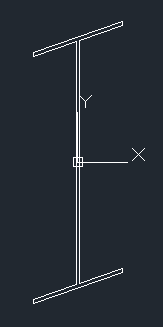
It is interesting to see the result in an I-beam shape if you use a 45° miter and 45° bevel:


As a matter of where this observation fits into mathematics generally, this is a projective or affine transformation. Such transformations preserve straight lines but they do not, in general, preserve right angles.

Aside: Convex Hulls

The fact that they preserve straight lines is a boon to the would-be-writer of a convex hull algorithm in an arbitrary plane since you can project the 3D coordinates onto a simple 2D plane and use the 2D algorithm (being careful to preserve or restore the other coordinate at the end). If you do so, you should probably choose which set of 2 coordinates to use for the algorithm, based on the direction of the plane. For example, if the normal of the plane has a larger z-coordinate than x- or y-coordinates, then the (x,y) pairs are best to use for the information to run the 2D convex hull algorithm on. There are two reasons to be picky about this:
  1. If the points fed to the routine are in thy yz-plane, you will get incorrect results (if you assumed the (x,y) coordinates should always be used).
  2. It may reduce the effect of rounding errors in the calculations (in terms of deciding whether points "near the line" of the hull are inside or part of the hull).
(I have lost the original code I used for this post, so I omit references to it now.)

See the Maxima project for download information for Maxima.

Saturday, February 1, 2014

Round 'em up!

Over the past several months I have been dabbling in Common Lisp (LISt Processing language).  Lisp, I think, is the ugly duckling of the programming languages. The facetious "Lost In Stupid Parentheses" seems more apt as an acronym.

My first encounter with this ungainly language (Lisp) was in AutoLisp (and Visual Lisp). I was on a hiatus from programming regularly and discovered this immediately discouraging language that was the "easiest" way to interact with AutoCAD programmatically. (I don't consider AutoCAD scripts to be programming, though I would still include them under the more general category automation.) I did not make much headway at that time and it frankly amazes me that any non-programmer will step up to the challenge and learn it.

But then there was Maxima. I was happy with Maxima as a free computer algebra system. But in the documentation I found the spectre of Lisp. Specifically, Common Lisp. The computations in Maxima are all in Lisp (though there is probably some non-Lisp they use to glue together a Windows interface for Maxima). Maxima itself supports a fairly robust set of programming constructs as far as doing calculations are concerned.
  • Input/output from files
  • Controlled loops
  • if-then-else
  • functions
  • plotting (via gnuplot—included in standard installs)
  • formatted output
    • nice math notation display
    • export to latex or image
Maxima is built on top of Lisp and you really have all the abilities of Lisp in Maxima (if you know how to get at them). But, being as I am, always in search of a better way of doing something, I am also concerned with whether a technology built on top of another is "hiding" some of the features of the underlying technology. Perhaps hiding isn't exactly the right way to put it, but learning Lisp is a paradigm shift from most other (Algol-like) programming languages I was familiar with, while on the other hand, learning Maxima didn't take me through that paradigm shift.

The two most interesting features of Lisp to me are the emphasis on function references and macros. But they both help you to do the same thing: reduce the repetition in your code. Mind you, they serve this end in very different ways.

When I wanted to implement Jarvis's march [1, p. 955] to encircle a list of points in a "convex hull" it was particularly the function referencing that made the implementation of the code fairly simple.

Fig 1. The red lines join together the red + signs which indicate the convex hull for these points.
The general idea of Jarvis's march is you find an outside point to start from and then keep picking the next point so that you never have to switch directions as you walk around. I started at the left most point. In the event of a tie, I choose the lower of these. (That would place us at about (0.1, 15.0).) I decided to walk around the points in a counter-clockwise direction. To decide which point comes next, I need to find the point which requires the right-most turn. So I begin by choosing the first of the remaining points (in whatever order I received them). I go through the remaining points and test whether I would need to make a right turn or left turn to point toward them (from my vantage point on the starting point of the hull chosen at my first step). If it is a right turn, then I have a new winner which replaces the first and I continue moving forward to the points not yet checked. The algorithm is really a repeated application of a maximum function where maximum is defined according to a different function than normal. What I need are predicate functions which define the rules for choosing a winner (a "maximum") and a routine to separate the winner from the remaining points that can accept a predicate function as a parameter.  Here's the code for, remove-winner:


The idea of remove-winner is to use the test function (supplied by the caller) to determine whether the next item is "better" than the current winner. If you passed in the function < (using the syntax #'<) you would get the smallest value in the list (provided it was a list of numbers). Notice the thought process in this function is not just to find the max and return it, but rather to produce a list which includes the "winner" and the rest of the values (that didn't win) separately. We don't just need to know the winner, we need to separate the winner from the rest.

When we get to the convex-hull routine, we can use the same routine (remove-winner) using two different tests: one to find the initial element and another to find the successive elements.


The first occasion we use remove-winner, the function is of the same sort we would use to perform a two key sort. In the main body of the routine, we have a more interesting function which accepts two points, calculates their direction vectors (using the current head node of the hull as the origin) and decides whether the second is a right turn away from the first, in which case it declares the second to be the (current) winner.

Can you do this [abstract the predicate] in other languages? Yes. In many other languages you could implement the routine substantially like this. But the key is this: would you ever think to do it this way if you were using VB.NET or C# or C++? Maybe. But not because of your experience with those languages, but because of your experiences with Lisp or F# or other languages which feature a functional style of programming.

Fig. 1 was produced from running a small bit of Maxima code which loads some routines from a separate package written in Lisp (including the above routines).  You can download both files to try them out:
You will need to have Maxima installed to try this example out.

Sources:
  1. Cormen, T.H., Leiserson, C.E., Rivest, R.L., & Stein, C., Introduction to Algorithms, Second Ed., McGraw-Hill Book Company / The MIT Press, 2001.

Wednesday, January 1, 2014

The Un-Pyramid

In previous posts I've discussed truncated pyramids and irregular triangular prisms, but I hadn't at that time thought to consider a "really irregular triangular prism" before.  I was searching on the general notions of these topics on the internet to see what people were thinking about with respect to them and found someone had something different in mind:  A 5 sided solid with a non-constant triangular cross-section and no faces (guaranteed) parallel with each other.

The first thing to note about this shape is the characterization of the faces.  The two "ends" are triangular faces. There are three quadrilateral faces which form the boundaries of the non-constant triangular cross-section. The three edges shared by the quadrilateral faces are not parallel with each other and the quadrilaterals could be completely irregular. Here is a quick video of a Sketchup model of just such a shape:


The Un-Pyramid from Darren Irvine on Vimeo.

Since the consecutive pairs of "side" edges are part of a quadrilateral (they are proper "faces"—no twists), they are certainly coplanar. In a previous post, I demonstrated that two parallel faces with edges joining corresponding vertices with consecutive edges being coplanar, the parallel faces are necessarily similar. I also demonstrated (Proposition 4) that the projected side edges intersect at a common point, which we may call the apex.

The un-pyramid does not have the two parallel faces that formed the starting point in that post. However, it does have the consecutive coplanar edges. And although we have not been given a "top" face parallel with the bottom, we can certainly make one. We establish a cutting plane through the closest vertex (or vertices—there could be two at the same level) of the "top" face which is parallel with the larger "bottom" face. (We can turn the un-pyramid around to make the names fit if it comes to us upside down or sideways.) Now we can be sure that the side edges can be projected to a common apex as per 3D Analogue to the Trapezoid (part 3).
Fig. 1.  A really irregular triangular pyramid? Hmm...
Calculating the volume of this shape requires a bit of calculation just to figure out how to break it up into pieces. If you want to program a solution to this problem, you are probably going to take in A1, B1, C1, A2, B2, and C2 as the parameters. To verify you have valid data establish that:
  • A1A2 is coplanar with B1B2
  • B1B2 is coplanar with C1C2
  • C1C2 is coplanar with A1A2
  • Also, make sure these same edges don't intersect each other (meaning the lines projected through them should intersect outside of the boundaries of the line segments).
You also need to determine whether the apex is closer to A1B1C1 or A2B2C2. Then reorder or relabel the end faces as necessary. The face further away is the base (say 1). Now determine which of the top vertices is closest to the base and establish a cutting plane through it, parallel to the base.

(Hint: It will be convenient to reorder or relabel your points so that A2 is the closest point, B2 next, and C2 furthest; this avoids polluting your code with cases. Don't forget to reorder the points in the base. You may have a job making the relabeling of previous calculation results work properly. Making clear code that does minimal recalculations is probably the most challenging aspect of this problem if treated as a programming challenge.)

Now we can calculate the volume as a sum of two volumes:
  1. Frustum of a (slanted) pyramid with base A1B1C1 and top A2BC.
  2. Slanted pyramid with base BB2C2C and apex A2
    • Find the area of the base
      • watch out for B = B2 and C = C2 which changes the shape of the base
        • If both are true, then you've dodged the bullet—there's no volume to worry about.
        • If B = B2, then either it is at the same level as C2 or the same level as A2. But in either case, you have a triangular base.
        • Very possibly neither of these will be true. Break the quadrilateral up into two triangles using the diagonal of your choice.
    • Find the height of the pyramid using the component method as for finding the height of the first volume.
But, what should we call it?
  1. triangular un-pyramid
  2. really irregular triangular prism
  3. skew-cut slanted triangular pyramid
    • alternatively, skew-cut slanted pyramid with triangular base
I guess I like 1) for the advertizing, 2) for the baffling rhetorical effect, and 3) for half a hope of conveying what the shape really is.

Find the Intersection of a Plane with a Line

We can represent a plane with four numbers, the coefficients of the general equation of a plane, as ax + by + cz + d = 0.  For convenience, we can represent this also as
where n = (a, b, c) and r = (x, y, z) is a point on the plane.

We take a line through two points, A and B, in vector form as

        L(t) = A + (B–A)t

We want to find the intersection of the line with the plane.  That is, we need f, such that

Then,
And so
The desired point is L(f), since it on the plane and on the line.

Notice that the calculation of f requires only the evaluation of the general equation of the plane using A and B as the points. The results will not be zero unless A and B are on the plane, in which case we would already have the result. If the line is parallel with the plane, then the denominator will be zero giving an indeterminate result. This fits with the geometric interpretation of the plane evaluation. The point of the last step in our derivation is that it simplifies the coding of the problem somewhat by reducing it to two plane evaluations. (If you observe carefully, you will see it makes the difference not of two additions but only of one.)

Evaluating the equation of a plane using a point not on the plane gives a result which is proportional to the distance between the planes. If the normal vector (n = (a, b, c)), has a magnitude of 1, then it yields the distance. However, in the formula we have derived, we have not depended on the equation of the plane being normalized. The constant of proportionality in the numerator cancels with itself in the denominator (I mean "behind the scenes" or if you derived it using a different approach) to produce the simple result for f above.

The idea for this solution came from initially viewing it as a linear interpolation problem, which, of course, it is. Similar triangles also are an acceptable approach the problem, though it may be more difficult to deal with the signs. The above derivation deals with sign transparently.

Friday, December 6, 2013

Volume of a Tetrahedon

In this article I give a rough outline of a derivation of the volume formula for a tetrahedron, given its four vertices.

Any set of three points in 3D are co-planar. If they are not co-linear, then they uniquely define a plane. They also uniquely define a triangle. With polygons of more than three sides/vertices, you need to specify which edges are drawn and which are not.  In a program, you might imply the edges according to the ordering of the points, but the order then is a means of indicating which edges to draw. You could not simply draw all of the possible edges and get a polygon, generally. But with a triangle, you take every pairing of points and draw an edge between them.

If you add a fourth point which is not in the same plane, you now have a tetrahedron (tretra = four)—a four sided polyhedron which is uniquely defined by four points. As in the case of the triangle, you draw an edge between every pairing of points. The number of combinations of 2 points is    
and so there are 6 edges.
A tetrahedron is a special case of a slanted pyramid. The same volume formula applies, namely,
                                                          
In order to use the formula, we must pick a face to serve as the base.  We choose the face with vertices P1, P2, and P3, in the above illustration. (It doesn't matter which ones as long as you're consistent.)  We need to calculate the area of the base and find the height of the pyramid. The height is the distance from P4 to the plane defined by the base points (the measure is taken perpendicular to the plane).

First we find the area. A well known formula for finding the area of a triangle given the length of two sides, say a and b, and the included angle, say θ,  is      
(With some minor trig you can figure this out, but if you just want to see it proved, see Area of Triangles Without Right Angles [1].) The cross-product comes in handy here since
where v and u are vectors and θ is the included angle. Thus, the area is
To find the distance from P4 to the base plane, we first find the plane. The equation of a plane can be expressed in terms of a normal vector and any point on the plane. The normal vector for our plane is
and the equation of the plane is
(This is a 3D analogue to the point-slope form of the equation of a line, albeit, it also resembles the general form.)

The height from the plane to P4 is the component of the vector (P4 – P1) which is in the direction of the normal vector, namely ([2], p. 679),

This leads to the volume formula
Sources:
  1. Math is Fun, Area of Triangles Without Right Angleshttp://www.mathsisfun.com/algebra/trig-area-triangle-without-right-angle.html
  2. Stewart, J., Calculus: Early Transcendentals, 3rd Ed., Brooks/Cole Publishing Company, 1995

Wednesday, November 6, 2013

Rotation of Planar Regions: Polyhedron in AutoCAD

In a previous post about the angle between intersecting planes, I noted the importance of measuring that angle perpendicular to the line of intersection.  Now I want to apply a similar notion to the rotation of planar regions.  In CAD programs that support solid and surface modelling, it is common to support planar regions. These programs do much more complicated things as well, of course, but they will certainly allow you to make, say, a hexagonal region.  A hexagonal region is not only the outline of the hexagon, but the area enclosed by that outline, all of which lies within the same plane as the outline.  Making a planar region in AutoCAD is straightforward:
  1. Change to one of the 3D workspaces.
  2. Create any closed sequence of line work (sometimes called a closed path), all of which should be coplanar.  (While you can create a closed path that is not coplanar, it won't suit our purpose here and you can't make it into a region.)
  3. Type Region, select the line work and press .
  4. To see the region, change the visual style as necessary:
    1. Click the View tab.
    2. Click the Visual Styles button on the Palettes pane.
    3. In the Visual Styles Manager (which should pop up) choose a style that shows the faces (if/when that is desirable).  I'm partial to Shaded with edges, but other styles may be suitable.
      1. Notice also the settings under Face Settings that can affect the way the faces appear (or not appear).
But I don't just want to make planar regions, we want to do something with them.  I want to rotate them about a line of intersection/adjacency and make multiple regions "fit" together.  I'm going to make, well, you'll see...(at the end of the video in this post)...

Description of the Problem

Suppose we are given three planar regions A, B, and C, such that A is adjacent to B and B is adjacent to C, with all of the regions being initially co-planar with each other.  We want to rotate A and C about their "line of adjacency" with B so that A and C are adjacent to each other.

Informally, we might say that A and C are the box flaps and B is the base.  You may intuit the analogy I'm making.  We are pretending we have a sheet of cardboard cut out in an unusual shape with two creases in it which will serve as the fold lines – our lines of adjacency.  Note also that the proximal lines of A and C (the ones we want to be coincident) need not be of equal length to do the kind of folding/rotating we want to do, but if they are not equal we may not get the result we desire.

We are currently looking at our box flaps in plan view.  Suppose we continue observing in plan view and fold the box flaps (about B).  B is unchanged in appearance but A and C appear "squished" in one direction.  Or, another way to think of it, every point on A will appear to move perpendicularly toward its line of adjacency with B.  Likewise for C.  Thus,


If for some reason the proximal lines of A and C were not of equal length (as they are above), for purposes of our construction, we would need to establish points of equal distance from their common vertex.  A circle centered on their common vertex would do nicely.  In AutoCAD we can work in 3D to do this rotation, but first let's consider how we would do this in 2D.  This will be informative as to how to proceed in 3D.

First observe how the arrows at the end of the proximal lines of A and C cross each other.  These arrows are in plan view with z = 0, but the point where these arrows intersect gives us the xy-coordinates of the point where the non-common vertices of the proximal lines will meet.  (If that doesn't make sense, just go with the picture.)  Now to make our 2D plan view work, we've got to do some single axis scaling.  Here's what we're looking at:


We need to scale region A along the y-axis by a factor of A2/A1 and scale C along an axis perpendicular to the line of adjacency with B by a factor of C2/C1.  Since we are working with only a small number of points here, we can simply draw lines of lengths A3 and C3 and scale them as needed.  We move and copy the lines as necessary so that we can move the vertices of the polygons to their new positions based on the newly scaled lines.  (To scale A in the y direction you could turn A into a block and scale the y-axis as desired.  To scale C you could use the "block"  and scale method too, but you'd have to adjust your UCS line up with the line adjacent to B – use the ucs command with the OBject option and click the line you want to line up with.)  Here's the scaled result:


I used the scale command with the reference option so that I didn't have to do the indicated math myself, but AutoCAD did in fact compute A3(A2/A1) and likewise for C.  (Incidentally, this doesn't work so nice with regions, though it works fine with polylines; it's a simple matter of moving vertices along a line perpendicular to the line of adjacency.)  As for making the other views work for you in 2D – you're on your own, because right now I'm posting how to do this in AutoCAD (full version).

Rotating Planar Regions to Make a Polyhedron in AutoCAD


Making of a Polyhedron in AutoCAD from Darren Irvine on Vimeo.


Friday, September 6, 2013

Find Snap Tangent Points

A common feature of CAD programs is support for tangent object snaps.  A line is drawn from some point, A, toward a circle with center C and radius r.  We want to find a point (or points), B, on the circle, such that AB is tangent to the circle.

Here's a sketch of the problem:


We are given the points A and C and the radius r.  The goal is to find B1 and B2.  We argue mainly for B1. The argument for B2 is the same.  We have assumed A is outside of the circle or else there are no solutions. (If you write code for this, you will need to check for this condition.)

Since AB1 is tangent to the circle and B1C is the radius of the circle, angle AB1C is a right angle.  The distances f and from A to C, say, d, may be calculated using the pythagorean theorem.  Now, we draw the altitude of triangle AB1C to E.  By similar triangles (ΔAB1C ~ ΔB1EC~ ΔAEB1) we determine that

and

and so, e = r2/d and a = f r/d.  We let δ be the normalized direction vector from C to A, namely,


Then point E is given by E = C + e δ.  Let δp= (δy, –δx), or the clockwise 90° rotation of δ.  Then points B1 and B2 are given by:

       B1 = E + a δp
and
       B2 = E – a δp,

which are the desired points.

Snap Perpendicular Code

"Snap perpendicular" is a way certain drawing programs (like AutoCAD and DraftSight) help the user to draw a line starting from some point C and draw it up to an existing line such that the new line is perpendicular to the existing one.  What would we do without "snap perpendicular"?  The alternative, I suppose, would be to hold a set-square on the computer screen.  Or, calculate the destination point.  Of course, the aforesaid programs do just that.  And so does the Maxima code at the end of this post.

Derivation

We're given an existing line segment AB in space and a point C.  We want to find a point P on line AB such that line segment CP is perpendicular to AB.  (We won't worry about whether it is on the line segment AB, just on the line AB; we omit a "range check".)  We observe that the perpendicular distance between a point and a line is the shortest possible distance and so we will treat this as a minimization problem, using the methods of calculus.  Let A = (Ax, Ay, Az) and similar for points B and C.  Then line AB is described by the parametric equations:

      x(t) = Ax + (Bx – Ax) t,
      y(t) = Ay + (By – Ay) t,
      z(t) = Az + (Bz – Az) t,

where P(t) = (x(t), y(t), z(t)).  We want to find P(t) such that line segment CP(t) is as small as possible, which is equivalent to finding when the square of the distance is minimized.  So, we define

D(t) = (C– x(t))2 + (C– y(t))2 + (C– z(t))2
       = (Cx – Ax – (Bx – Ax) t)2 + (Cy – Ay – (By – Ay) t)2 + (Cz – Az – (Bz – Az) t)2.

Taking the derivative yields:

D'(t) = 2 (Cx – Ax – (Bx – Ax) t) (– (Bx – Ax)) + 2 (Cy – Ay – (By – Ay) t) (– (By – Ay)) +2 (Cz – Az – (Bz – Az) t) (– (Bz – Az))

We solve for t when D'(t) = 0 as follows:

0 = (Cx – Ax – (Bx – Ax) t) (Bx – Ax) + (Cy – Ay – (By – Ay) t) (By – Ay) + (Cz – Az – (Bz – Az) t) (Bz – Az)

[(Bx – Ax)2 + (By – Ay)2 +  (Bz – Az)2] t = (Cx – Ax)(Bx – Ax) + (Cy – Ay)(By – Ay) +  (Cz – Az)(Bz – Az)

t = [(Cx – Ax)(Bx – Ax) + (Cy – Ay)(By – Ay) +  (Cz – Az)(Bz – Az)]/[(Bx – Ax)2 + (By – Ay)2 +  (Bz – Az)2]
which can be stated more succinctly in terms of vector notation as
\[t = \frac{(B - A) \cdot (C-A)}{(B-A)\cdot (B-A)}\]
from whence derives the below Maxima code:


To prove that the point thus obtained is indeed the desired "Snap Perpendicular" point, it would be sufficient to show that the dot product of the vectors (A – B) and (C – P) is equal to zero, which check, I omit.

3D Analogue to the Trapezoid (part 3)

Suppose we have two parallel polygonal faces with a non-zero distance between such that, for some pairing of vertices, every consecutive pair of edges connecting the paired vertices are coplanar. It follows that the faces joining the two given parallel polygonal faces are quadrilaterals.  At first, it might not appear that this is a sufficient condition to assert that the shape thus described is a frustum of a slanted pyramid.  In this post I proceed to prove that it is.  For the volume formula of a frustum of a pyramid (slanted or otherwise), see this previous post of mine.

I term the parallel polygonal faces the end faces and the other faces as the side faces.

Proposition 1 (Transitivity of Parallel Lines).
  1. Let P be a plane and L a line parallel with P. Every line parallel with L is also parallel with P.
  2. Let L, M, N be lines. Then, if L is parallel with M and M with N, then L is parallel with N.
Proposition 2. The corresponding edges of the polygons are parallel with each other.
Fig. 1. Partial drawing of  two parallel planes.  AC is the "bottom edge" and BD is the "top edge".  AB and CD are "side edges".  Consecutive side edges are coplanar with each other.
Proof: Assume without limitation that the faces are parallel with the horizontal plane. Since the faces are parallel, the edges do not change in proximity vertically. Consider any two consecutive edges AB and CD joining the two end faces with corresponding vertices A with B and C with D. Draw line EF with E on line AC (edge of bottom face) and F on BD (edge of top face; extend BD as necessary) such that EF is perpendicular to AC. EF is coincident with the plane of quadrilateral ABDC and so is coplanar with all of its edges.
Fig. 2. We show the construction of B'D' as a line which is coincident with BD, but this is not given as a condition in the construction. That is to be proved. At construction we take neither parallelness nor coincidence with BD for granted. Because it is the same distance from AC as the point F, however, we do know there is at least an intersection between B'D' and BD at F.

Let B' and D' be points such that AB' and CD' are of length(EF), coincident with the plane of quadrilateral ABDC, and perpendicular to AC. Then AB' and CD' are parallel.

If you want to go crazy with the details to see that B'D' is parallel with AC, see the parenthetical section below. I obviously did want to go crazy. Normal people can skip ahead.

(By side-angle-side, triangle AB'C is congruent with triangle CD'A. Thus,
Also, since the non-right angles of a right triangle sum to 90°,

                                               
Thus, triangles B'AD' and D'CB' are congruent by side-angle-side. Hence,
By alternating interior angles,
Since the angles of a triangle sum to 180°,
Hence, angle B'D'C is a right angle.  By a similar argument, angle D'B'A is a right angle and so quadrilateral AB'D'C is a rectangle and thus B'D' is parallel with AC. Since F is length(EF) away from AC, in the same plane as quadrilateral AB'D'C, on the same side of AC, it is on line B'D'.)

Fig. 3. The shape we are discussing doesn't really look like this, but how do we know it doesn't look like this? How do we know Fig. 2. isn't the one that's wrong? See rest of argument below.
Assume that lines BD and B'D' are not coincident. Both are coincident with a common plane and so are coplanar. Since quadrilateral ABDC is on an angle from horizontal and BD and B'D' are not coincident, there is some point, P, on B'D' which is below BD. But point F is coincident with both BD and B'D'. Since BD is parallel with horizontal (it is part of a polygonal face which is horizontal), and B'D' has at a point on and a point below BD (points F and P, respectively), B'D' is not parallel with the horizontal plane. But, since AC is parallel with the horizontal plane, the parallel line B'D' must be parallel with the horizontal plane (Proposition 1), which is a contradiction. Thus our (limiting) assumption is wrong and lines BD and B'D' are coincident. It follows that BD is parallel with AC.■

Corollary 1. The walls of the prism are trapezoidal.

Proof: The corresponding edges of the end faces are parallel.■

Corollary 2. Every cross-section of the prism, parallel with the end faces, has corresponding edges parallel with the end faces.

Proof: Fix any cross-section parallel with the end faces and observe that the side edges are intersected by this cross-section so as to produce a polygonal face, whose vertices and edges correspond with the bottom face in the same way the top face did in the proof of Proposition 2. The same argument, therefore, applies.■

Proposition 3. The top and bottom faces are similar shapes.

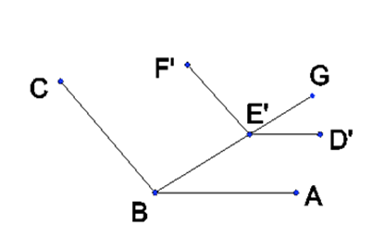
Proof: It suffices to show that the interior angles at each pair of corresponding vertices are equal. Let A, B, and C be consecutive vertices of the bottom polygon and D, E, and F be the corresponding vertices of the top polygon, respectively. By Proposition 2, DE is parallel with AB and EF is parallel with BC. There exists vertices D’, E’, and F’ which are translated vertically from the top polygonal face down to the plane of the bottom polygon. By this we obtain lines D’E’ and E’F’, in the plane of the bottom polygon which are parallel with DE and EF, respectively. By Proposition 1, D’E’ is parallel with AB and E’F’ is parallel with BC. Draw a line through B and E’ to some point beyond E’, say, G (see Figure 1).
image
Figure 1. AB || D’E’ and BC || E’F’.

Then we have corresponding angles ABE' = D'E'G and CBE' = F'E'G. Thus, ABC = D'E'F'. We take for granted that the translation of DEF to D’E’F’ did not alter the angle between the lines and so we have our result.■

Corollary 3. The cross-section taken parallel with the end faces is everywhere similar to the ends.

Proof: By observing that the parallel cross-section intersects the trapezoidal walls of the prism so as to produce lines which are parallel to the base and top (Corollary 2), the argument applied for Proposition 3 applies here as well.■

Proposition 4.  The lines extended from the side edges intersect at a common point (the apex).

Proof:  Consider three consecutive vertices on the base A, B, and C, and corresponding vertices D, E, and F on an arbitrary parallel cutting plane parallel with ABC. By corollary 3,
Since AD and BE are coplanar, they intersect at some point P. Similarly, BE and CF intersect at some point Q. Assume that P ≠ Q. Take a section parallel to the base through P and label the vertices of the section which correspond to A, B, and C as D, E, and F and observe that the above proportion equation still follows from corollary 3. Also, D = E = P and so line segment DE = 0. However, since P ≠ Q, line segment EF ≠ 0, which contradicts the proportion above. Therefore, our assumption that P ≠ Q is wrong and we have P = Q. By the principle of mathematical induction, the proposition follows.  [Finding P is (i) 2 in S and establishing P = Q is (ii) the inductive step. 1 in S is either automatic or ill-defined I suppose, but irrelevant anyway.]■

The shape we have considered in this post is a frustum of a (possibly slanted) pyramid by proposition 4.

We conclude by noting that the argument for determining the volume of the frustum of a pyramid does not impose a condition that requires the top face to be centered over the bottom face. A slant does not alter the argument and therefore the result is the same. Note, of course, that the height must be measured perpendicularly to the end faces. It should be noted that we have not dealt in this post with the relationship between the cross-sectional area and the height, which relationship is needed in order to establish the volume formula.

Such proof involves 1) similar triangles, using the height of the apex as a reference, and 2) the relationship between linear dimensions and the area(s) they pertain to. Assurance of the existence of a proper apex is the critical component addressed in this post.

Thanks to one of my readers for the question at the end of a previous post that led to this post.