Showing posts with label AutoCAD. Show all posts

Wednesday, December 6, 2017

Equation of Circle in 3D and Snap Tangent

For a time I was on a bit of an AutoCAD like calculation kick and went through some interesting calculations like snap tangent, snap perpendicular, and intersection of a line with a plane. I wanted to take the next step on snap tangent and consider snap tangent to a sphere.

Snap tangent means, start with some point and try to find a point on the destination object (circle, sphere, ellipse, anything) that causes the line segment between the first point and the second point to be tangent to the object selected. My post about snap tangent, showed the result for a circle and worked in 2D. If you get the concept in 2D and are ready to take the concept to 3D for a sphere, you probably recognize without proof that the set of possible points on the sphere which will result in a tangential point, forms a circle. You can pretty much mentally extrapolate from the following picture which a repeat from the previous post.

Fig. 1 - Can you imagine the snap tangent circle on this if we allow the figure to represent a sphere? The snap tangent circle has center \(E\) and radius \(a\).
I will not repeat the method of calculation from the previous post but will simply observe that we can produce the values \(E\) and \(a\), which are the center and radius of the snap tangent circle. We add to this the normal of this circle, \(N = A - C\), and then normalize \(N\).

So, now we need a way to describe this circle which is not too onerous. A parametric vector equation is the simplest expression of it. We take our inspiration from the classic representation of circles in parametric form, which is
\[ p(\theta) = (x(\theta), y(\theta)) \] \[ x(\theta) = r \cos{\theta} \] \[ y(\theta) = r \sin{\theta}. \]
We have a normal from which to work from, but we need to have an entire coordinate system to work with. The classic parametric equations have everything in a neat coordinate system, but to describe a circle that's oriented any which way, we need to cook up a coordinate system to describe it with. Observe a change to the foregoing presentation that we can make:
\[ p(\theta) = r \cos{\theta} (1, 0) + r \sin{\theta} (0, 1) = r \cos{\theta} \vec{x} + r \sin{\theta} \vec{y}\]
The normal vector we have is basically the z-axis of the impromptu coordinate system we require, but we don't have a natural x-axis or y-axis. The trouble is there are an infinite number of x-axes that we could choose, we just need something perpendicular to \(N = (n_x, n_y, n_z).\) So, let's just pick one. If I take the cross product between \(N\) and any other vector that isn't parallel to \(N\), I will obtain a value which is perpendicular to \(N\) and it can serve as my impromptu x-axis. To ensure I don't have a vector which is close to the direction of \(N\), I will grab the basis vector, which is the most "out of line" with the direction of \(N\). So, for example (F# style),

        let b = if abs(normal.[0]) <= abs(normal.[1]) then    
                    if abs(normal.[0]) <= abs(normal.[2]) then
                        DenseVector([| 1.0; 0.0; 0.0 |])
                    else
                        DenseVector([| 0.0; 0.0; 1.0 |])
                else
                    if abs(normal.[1]) <= abs(normal.[2]) then
                        DenseVector([| 0.0; 1.0; 0.0 |])
                    else
                        DenseVector([| 0.0; 0.0; 1.0 |])

In this case, I have 
\[\vec{x} = b \times N\] \[\vec{y} = N \times \vec{x}.\]
Using this impromptu coordinate system, I can express an arbitrary circle in parametric form, having center \(C\) and radius \(r\) as
\[ p(\theta) = C + \vec{x} r \cos{\theta} + \vec{y} r \sin{\theta}.\]
Thus, our snap tangent circle is given from above as 
\[ p(\theta) = E + \vec{x} a \cos{\theta} + \vec{y} a \sin{\theta},\]
where we would use \(N = A - C\) (normalized) to be the beginning of our coordinate system.

Thursday, August 6, 2015

Polylines: Radius-Bulge Turnaround

The dxf representation of LWPOLYLINEs represents arcs using the end points of the arc and a bulge factor which is the tangent of a quarter of the central angle of the arc (see this previous post). We want to interchange between the radius and the bulge factor (both ways). Let's pull up the earlier diagram.

Looking at the diagram, we can produce several useful formulas. Taking the bulge factor as \(b\), observe that
\[b = \tan {\theta \over 4} = {i \over u/2} = {2 i \over u}\tag{1},\]
where we are temporarily ignoring the issue of sign.
The distance \(u\) is simply the distance from \(A\) to \(B\) and these point are always given to us in the context of a polyline whether we are given the bulge factor or the radius. We write this as 
\[u = ||B-A||.\tag{2}\]
Using the Pythagorean theorem we have
\[r^2 = {u^2 \over 4} + a^2 .\tag{3}\]
Using the substitution \(a=r-i\), we obtain
\[r^2= {u^2 \over 4} + (r-i)^2 = {u^2 \over 4} + r^2 - 2 r i + i^2\]
and so
\[2 r i = {u^2 \over 4} + i^2.\tag{4}\]

Radius/bulge direction => Bulge factor

Using equation (3), we can solve for \(a\)
\[a = \sqrt{r^2 - \frac{u^2}{4}}.\]
From this we can obtain \(i = r - a\) which allows us to calculate \(b\) according to equation 1. Additionally, set the sign of \(b\) to be positive for a CCW arc and negative for a CW arc. Alternatively stated, \(b\) is positive if the peak of the arc is a right offset from ray \(\overrightarrow{AB}\) and negative if the peak is a left offset from ray \(\overrightarrow{AB}\). In our diagram above, if point A comes before point B in the order they occur in the polyline, then we have a CW arc (P offset to the left of \(\overrightarrow{AB}\)) and so \(b\) should be negative. A negative bulge value indicates bulging to the left and a positive value indicates bulging to the right.

Bulge factor => Radius/bulge direction

We calculate \(u\) from \(A\) and \(B\) and then substitute equation 1 (solved for \(i\)) into equation 4 to get
\[2 r \frac{b u}{2} = \frac{u^2}{4} + \frac{b^2 u^2}{4}\]
\[4 r b =  u + b^2 u\]
\[r = u \left(\frac{1 + b^2}{4 b}\right).\]
Note that we would actually use the absolute value of \(b\) to obtain a positive radius. We can use the same logic as above for determining CW versus CCW (it's "iff" logic).

Locating the Center Point

Whether we are given the radius or bulge factor, we may want to find the center point. From above, we know we have \(u\), \(i\), \(b\), \(r\), and \(a\) all easily available to us if we need them.

We take our unit vector for the direction of the line segment taken from \(A\) to \(B\) as \(d = (B-A)/u\). Then the normal direction (90° right turn for offsetting) is given by
\[N = (d_y, -d_x).\]
Taking \(\sigma = {\rm signum}(b)\),
\[C = \frac{A+B}{2} - \sigma a N\]
\[P = \frac{A+B}{2} + \sigma i N\].

In my next post, I show a way to implement this in Maxima.

Saturday, September 6, 2014

Bulge Value (code 42) in LWPolyline

Polylines are a pretty handy way to represent and manipulate outlines of objects in CAD software. However, the very robust polyline entity can do so many things that it is somewhat complicated. The light weight polyline (LWPolyline) entity is a trimmed down version of polylines that does the most frequently needed things fairly compactly and straight-fowardly.

LWPolylines are strictly 2D objects. Of course, they can be created in a UCS other than the WCS but they will be planar, and the points stored in them will be 2D points relative to their object coordinate system (OCS—I haven't really worked with OCSs so I'm not much help other than to tell you to learn the Arbitrary Axis Algorithm described in the free DXF Reference from Autodesk, which I've never actually learned properly).

LWPolylines still have the ability to represent arcs. Actually, I don't know how these are represented in Polylines, but in LWPolylines, arcs are fairly simple. All you need is the bulge value (code 42) which is tan(θ/4), where θ is the central angle.
Fig.1. θ is the central angle.
Which raises an interesting question: why for do we need the tangent of a quarter of the central angle?
Fig. 2. If the arc above was drawn from A to B, the bulge value would be negative (CW).
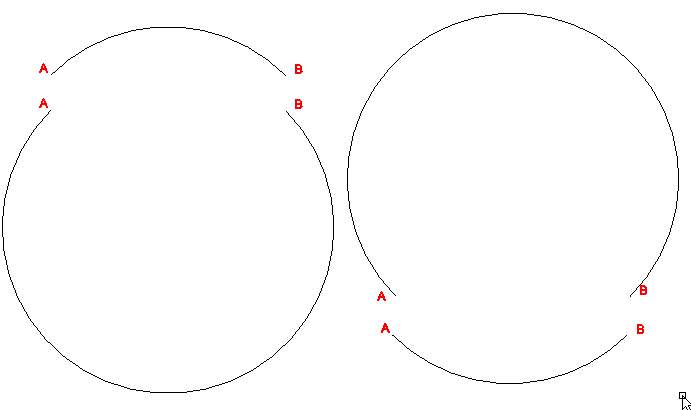
One reason is that it is compact. Other than storing points A and B, which you already need, the only additional information to unambiguously denote the arc from A to B is the bulge value. If the radius was stored instead, we would have up to 4 different arcs that could be being referred to. The SVG representation requires you to enter two parameters after the radius that clarify which of the four arcs you want. SVG is trying to be human reader friendly, but in DXF, we're not as worried about that. I find it easier to deal with the bulge as far as computations are concerned.
Fig. 3. Four possible arcs of a given radius drawn from A to B. Which one do you want?
I imagine the choice of storing the tangent of the angle is computation speed. The choice of a quarter of the angle is probably for two reasons:
  1. Tangent has a period of 180°. Now, if you used the tangent of half the angle subtended, this might appear initially to be sufficient, except that you would not be able to use the sign of the value to decide between CW and CCW since you would need the sign to decide between less than or greater than 180° arcs. You would also have an asymptote get in the way of drawing semi-circles. By storing the tangent of a quarter of the arc subtended, we restrict the the domain to angles which yield a positive tangent and so the sign value can be used for something else. It also avoids data representation limitations until you get close to having a complete circle (at which point, the user should probably consider using a circle). I don't know what the solution technically would be for storing a full circle other than a key value or just not letting the user do that—don't know what happens.
  2. The diagram above shows some handy interrelationships that allow us to fairly easily calculate the rise (i), the radius, the peak (P), and the center (C). A bit of algebra produces \(r = \frac{u (b^2+1)}{4b}\) and \(i = \frac{b u}{2}\), where \(b\) is the bulge value and \(u\), \(r\) and \(i\) are as in Fig. 2. Calculating \(u\) unfortunately requires a square root, but no trigonometric function calls. Finding C and P involves using \(r\) and \(i\) along with a vector perpendicular to line AB [e.g., \((x,y) \to (-y,x) \), but watch which one gets the negative depending on which way you're turning].
(See Polylines: Radius-Bulge Turnaround for follow up post to this one.)

Friday, September 6, 2013

Snap Perpendicular Code

"Snap perpendicular" is a way certain drawing programs (like AutoCAD and DraftSight) help the user to draw a line starting from some point C and draw it up to an existing line such that the new line is perpendicular to the existing one.  What would we do without "snap perpendicular"?  The alternative, I suppose, would be to hold a set-square on the computer screen.  Or, calculate the destination point.  Of course, the aforesaid programs do just that.  And so does the Maxima code at the end of this post.

Derivation

We're given an existing line segment AB in space and a point C.  We want to find a point P on line AB such that line segment CP is perpendicular to AB.  (We won't worry about whether it is on the line segment AB, just on the line AB; we omit a "range check".)  We observe that the perpendicular distance between a point and a line is the shortest possible distance and so we will treat this as a minimization problem, using the methods of calculus.  Let A = (Ax, Ay, Az) and similar for points B and C.  Then line AB is described by the parametric equations:

      x(t) = Ax + (Bx – Ax) t,
      y(t) = Ay + (By – Ay) t,
      z(t) = Az + (Bz – Az) t,

where P(t) = (x(t), y(t), z(t)).  We want to find P(t) such that line segment CP(t) is as small as possible, which is equivalent to finding when the square of the distance is minimized.  So, we define

D(t) = (C– x(t))2 + (C– y(t))2 + (C– z(t))2
       = (Cx – Ax – (Bx – Ax) t)2 + (Cy – Ay – (By – Ay) t)2 + (Cz – Az – (Bz – Az) t)2.

Taking the derivative yields:

D'(t) = 2 (Cx – Ax – (Bx – Ax) t) (– (Bx – Ax)) + 2 (Cy – Ay – (By – Ay) t) (– (By – Ay)) +2 (Cz – Az – (Bz – Az) t) (– (Bz – Az))

We solve for t when D'(t) = 0 as follows:

0 = (Cx – Ax – (Bx – Ax) t) (Bx – Ax) + (Cy – Ay – (By – Ay) t) (By – Ay) + (Cz – Az – (Bz – Az) t) (Bz – Az)

[(Bx – Ax)2 + (By – Ay)2 +  (Bz – Az)2] t = (Cx – Ax)(Bx – Ax) + (Cy – Ay)(By – Ay) +  (Cz – Az)(Bz – Az)

t = [(Cx – Ax)(Bx – Ax) + (Cy – Ay)(By – Ay) +  (Cz – Az)(Bz – Az)]/[(Bx – Ax)2 + (By – Ay)2 +  (Bz – Az)2]
which can be stated more succinctly in terms of vector notation as
\[t = \frac{(B - A) \cdot (C-A)}{(B-A)\cdot (B-A)}\]
from whence derives the below Maxima code:


To prove that the point thus obtained is indeed the desired "Snap Perpendicular" point, it would be sufficient to show that the dot product of the vectors (A – B) and (C – P) is equal to zero, which check, I omit.

Saturday, March 31, 2012

Defining a User Coordinate System

In AutoCAD you have User Coordinate Systems (UCS) and the World Coordinate System (WCS). The WCS is the system which your model information is stored in. The UCS is what you draw in. When you first begin a drawing, the current UCS is the same as the WCS.

First, let's familiarize ourselves with how the WCS looks. I've drawn a pyramid in AutoCAD and shown it from several different angles:


The WCS is displayed in all four pictures (and, naturally, is exactly the same in each picture).  One of the techniques for dealing with 3D when you are "doing the math" (perhaps in your own code) and want to make sure the math (or code) you're writing matches the geometry you're working with is known as "the right hand rule."  (We're going to use this for some math coming up in a few paragraphs.) For each picture, look at the WCS and orient your right hand (which should be open face initially) so that your fingers are pointing in the direction of the x-axis and your palm is open toward the direction of the y-axis.  (Don't think about your arm, just your hand. The arm will just go wherever it needs to go, though it may look funny to onlookers.)  Curl your fingers into your palm and stick your thumb out. If you've done it correctly, your thumb should be pointing in the direction of the z-axis.  If you can do this with all four pictures, you're well on your way to being able to understand the rest of the math in this post.

In math notation, we might write the relationship above as something like z = x × y.  The relationships which apply to the WCS (and all UCSs) are

  • x = y × z
  • y = z × x
  • z = x × y

Two of the best ways to change the UCS in AutoCAD are

  • Rotate around a chosen axis:  this is one of the more intuitive ways to adjust the current UCS when you don't have "pickable points" in the plane you want the new xy-plane to be in.
  • Pick three points:  this is a way to put the current UCS in line with a face or in line with somewhere you want to put a face.  Lining up with an existing face of a 3D drawing only requires to you to pick three of the corners of the face.  Depending on the order you pick those points in, you will get different directions for the axes, but the xy-plane of the new UCS will coincide with the three points you pick.
So, how do you define a UCS based on a three points?  Three points define a plane, but that isn't enough to define a UCS.  You need to know where the origin is, which direction the new x-axis is to go, which way the new y-axis is to go, and you also need to pick a direction for the z-axis that is consistent with the way the z-axis relates to the xy-plane in the WCS.  Note that if we just solved the equation of a plane (Ax + By + Cz + D = 0) for the three points we start with, we would not know which way the z-axis goes.  Is it above the plane? below? and why?

To obtain consistent definitions for these axes we use the cross product (which I tried to sneak in earlier:  z = x × y).  Here's the definition of the cross product:

        a × b = (a2 b3 - b2 a3, a3 b1 - b3 a1, a1 b2 - a2 b1),

where a = (a1, a2, a3) and b = (b1, b2, b3). Think about these vectors as direction vectors as opposed to points.  One of the important properties of the cross product is that it produces a vector which is perpendicular to both of the vectors that form the product. That is, a × b is perpendicular to a and to b. To determine which way a × b is pointing, point your fingers (using your right hand) in the direction of a with your palm facing in a direction such that you can curl your fingers toward b.  Your thumb is pointing in the direction of a × b.

Here's how a UCS is defined based on three points. The first point (P0) indicates the position of the new origin. The second point (P1) defines the direction from the first point the x-axis goes in. So, the direction of the new x-axis is x = P1 − P0. The third point (P2) determines not only the plane, but also which side of the x-axis the y-axis will go (within the defined plane). At the same time, we are also defining, albeit indirectly, the direction of the z-axis by means of the right hand rule. We define our UCS accordingly:
  • Origin: P0
  • x-axis: x = P1 − P0
  • z-axis: z = x × (P2 − P0)
  • y-axis: y = z × x
Notice the z-axis is defined before the y-axis as well as the order of factors which produce y. Also observe that the order in which you select the points affects which way your axes are oriented, even though it will not affect what plane is the xy-plane of your new UCS. Given any three points, there are three possible origins - so I need to specify which is the origin. With that selected, I have two options for which will indicate the direction of my x-axis. So, there are six possible UCSs given the same three points in different orders.

Depending on the use of your UCS (if you are programming one in your own software) you may wish to normalize the direction vectors. Normalized vectors (which have length equal to unity) have some useful properties which may save some computation in later calculations. Normalizing is straightforward and simply requires you to divide the value of each component of the vector by the current length of the vector.